WhatsApp is generally restricted on locally routed mainland China connections. International roaming data can behave differently because it may follow an international route.
Quick answer: WhatsApp may work over internationally routed roaming data even when it does not work on local Wi-Fi or a local SIM. A travel eSIM is not a VPN, and access to any third-party app can change.
Does WhatsApp work in China? The short answer
Text, media, WhatsApp Web and calls may fail on local mobile data or locally routed Wi-Fi. International roaming is different: the phone connects to a partner network in China, while the provider may carry data through an international route.
An eSIM is a digital SIM profile—not a VPN. The route may provide a different access environment, but app availability still depends on the provider, plan, device, location and the app itself.
What Ezigo provides
Ezigo’s mainland China eSIM is a data-only international roaming product. Total plans use China Mobile; Standard daily and Unlimited plans use China Unicom. All current plans support hotspot sharing and automatic network registration. It does not include a mainland phone number, carrier calls or SMS.
Why WhatsApp behaves differently on local Wi-Fi, roaming and a travel eSIM
A phone on hotel Wi-Fi does not use the same route as a phone on international roaming data—even in the same room.

| Connection | Practical expectation |
|---|---|
| Hotel Wi-Fi or local SIM | Locally routed; international services may be restricted. |
| Home-carrier roaming | Can differ from local Wi-Fi, but price and routing depend on the carrier. |
| Travel eSIM | Uses a partner network and provider-specific roaming route; app access is not guaranteed. |
| VPN | A separate encrypted service with its own setup, reliability and legal considerations. |
What about Google, Instagram and other travel apps in China?
Google, Instagram and other international services can also behave differently on local and international routes. Prepare essential functions offline rather than relying on one app or connection.

- Maps: download offline areas and save hotel or station addresses in Chinese.
- Messaging and accounts: update apps, sign in and confirm recovery options before departure.
- Social media and calls: disable high-quality uploads and test before an important call.
- Bookings and documents: save confirmations, tickets and emergency contacts offline.
Four price-led Ezigo China eSIM picks
These four options show the clearest price and usage differences. Messaging and maps are light; calls, video, backups and hotspot use need more data.
1GB Total · 7 days
Best for short stays, messaging, airport transfers, maps, translation and essential booking checks. Fixed 1GB pool on China Mobile; hotspot supported.
3GB Total · 30 days
A low-cost choice for occasional mobile data across a longer itinerary. Fixed 3GB pool on China Mobile; suitable when heavy video use is not planned.
10GB Total · 30 days
Better for frequent navigation, messaging, image uploads and regular browsing. Fixed 10GB pool on China Mobile with hotspot sharing.
Unlimited · 7 days
1GB of high-speed data per day, then continued data at up to 5Mbps. Uses China Unicom and suits calls, heavier app use and hotspot needs better than a small fixed pool.
More Total, Standard daily and Unlimited combinations are available on the product page. The displayed prices include the automatic 10% discount; no code is required. The live checkout price is the final reference.
Choose mobile data for your mainland China trip
Compare Total, daily and Unlimited data-only plans with hotspot support, automatic network selection and 24/7 assistance.
COMPARE CHINA ESIM PLANSSet up the eSIM and essential apps before departure
Prepare over stable Wi-Fi. The QR code is intended for one installation, so do not delete the profile as a first troubleshooting step.
- Check the phone. Confirm eSIM support and carrier-unlock status with the device compatibility guide.
- Prepare apps and backups. Sign in, download offline maps and save bookings, addresses and recovery details.
- Install over reliable Wi-Fi. Follow the Ezigo eSIM installation guide and label the line “China Travel.”
- Set the data lines. Keep the primary SIM for verification, disable its roaming and automatic data switching, then select Ezigo for mobile data.
- Connect after arrival. Turn on the travel line and enable Data Roaming for that line.
- Run a basic test. Open a normal webpage, send a message and check a map before a large download or important call.

Validity begins when the eSIM first connects to a supported mainland China network; installing it before departure only prepares the profile.
Shanghai field test: the supplied test conditions and results
Ezigo’s test team supplied this record for Shanghai, August 1, 2026: iPhone 16 Pro, Unlimited 7 Days (US$24.63) and China Unicom. The iOS version was not recorded.
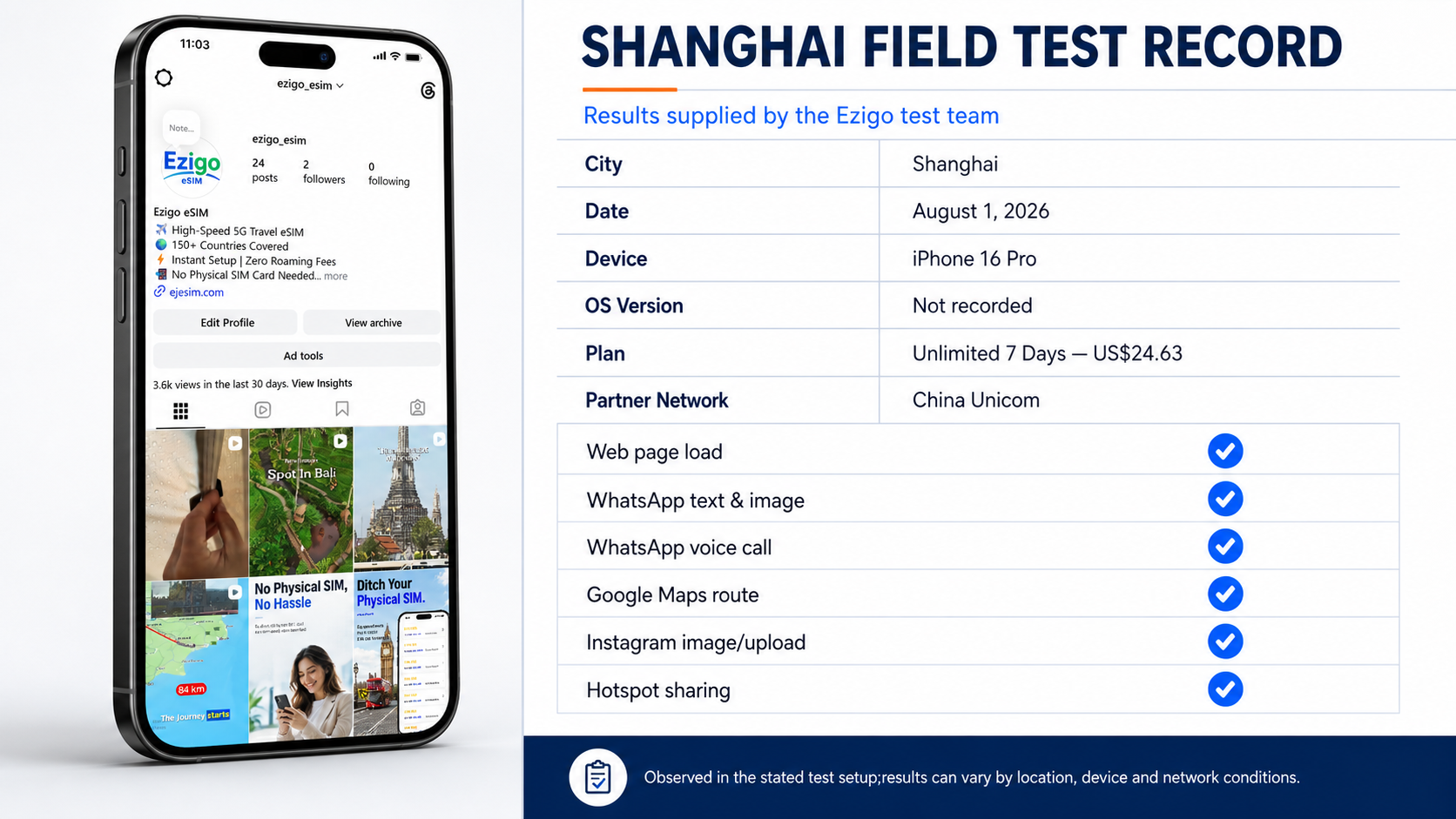
| Test item | Supplied result |
|---|---|
| Ordinary webpage loading | Supported |
| WhatsApp text and images | Supported |
| WhatsApp voice call | Supported |
| Google Maps search and routes | Supported |
| Instagram image load or upload | Supported |
| Hotspot sharing | Supported |


Troubleshooting WhatsApp or another app on a China eSIM
First check whether all mobile data has failed or only one app is affected.
| Problem | What to check first | Next action |
|---|---|---|
| No website or app loads | Confirm the Ezigo line is on, selected for mobile data and has Data Roaming enabled. | Toggle Airplane Mode briefly, restart the phone and contact support if registration does not return. |
| Normal websites load but WhatsApp does not | Turn Wi-Fi off, retry over mobile data and check whether the issue affects messages, calls or both. | Update the app and wait before changing network settings unnecessarily. |
| WhatsApp works on mobile data but not hotel Wi-Fi | The route has changed from roaming data to local Wi-Fi. | Continue over the travel eSIM when appropriate or use an independently selected connection solution. |
| Calls are poor or data slowed | Check signal and whether the high-speed allowance has been used. | Move to stronger reception, reduce video quality or review the plan rules. |
| The eSIM was deleted | A one-time QR code may not reinstall. | Contact support with the order number and never post the QR code publicly. |
| QR code was not received | Check the purchase email and spam folder. | Contact Ezigo by email or WhatsApp through the support page. |
Ezigo support is available 24 hours a day and typically responds within five minutes. Customers whose eSIM has not been installed, cannot be installed or cannot be activated can request a refund under the refund policy.
Frequently asked questions about WhatsApp and China eSIMs
Does WhatsApp work in China with a travel eSIM?
It may work over an international-routing travel eSIM even when it is unavailable on a locally routed connection. Actual availability can vary by provider route, plan, device, location, network conditions, app version and service policy.
Does Ezigo guarantee WhatsApp, Google or Instagram access?
No universal third-party app guarantee is made. Ezigo provides data through an international roaming route, but individual services can change their availability or behavior independently.
Is an Ezigo China eSIM a VPN?
No. It is a data-only eSIM using an international roaming arrangement. It does not provide a separate VPN account or claim to encrypt all traffic in the way a VPN service does.
Will my WhatsApp number change when I use the eSIM?
Normally, no. The travel eSIM can provide cellular data while WhatsApp remains registered to the existing number. Keep the primary line available if you may need verification messages.
Will WhatsApp work on hotel Wi-Fi in mainland China?
It may not. Hotel Wi-Fi generally uses locally routed internet. If an app stops loading after joining Wi-Fi, turn Wi-Fi off and test it again over the travel eSIM’s mobile data.
Does the China eSIM include calls or SMS?
No. The current Ezigo mainland China product is data-only and does not include a local phone number, carrier voice calls or SMS.
Can I share the China eSIM through a hotspot?
Yes. All current Ezigo China plans support hotspot sharing. Connected devices use the same plan allowance, so video, backups and laptop updates can consume data quickly.
Should I install the eSIM before arriving in China?
Yes. Install it over stable Wi-Fi before departure, keep the QR code private and select the Ezigo line for mobile data after arrival. The QR code is intended for one installation.
Conclusion
WhatsApp is generally unreliable on locally routed mainland connections, while international roaming data can behave differently without being a VPN or guaranteeing app access. Prepare your eSIM, apps and offline information before departure, then choose an allowance that fits your usage. Compare current data-only options on the Ezigo China eSIM page.
Sources and editorial note
- GSMA roaming architecture and specifications
- Apple: Using Dual SIM with an eSIM
- Ezigo China mainland eSIM
- Ezigo installation guide
- Ezigo device compatibility guide
- Ezigo contact and support
- Ezigo refund policy
- Airalo published WhatsApp in China guide
- Nomad published WhatsApp in China guide
Editorial note: External guidance was reviewed for common traveler questions. Test records are identified as Ezigo-supplied and limited to their stated conditions; no competitor test is presented as Ezigo evidence. Third-party services and network behavior can change.
High-speed data, wherever your journey leads
Enjoy instant, secure mobile data with Ezigo eSIM in 200+ destinations. No physical SIM needed.